|
Screen
|
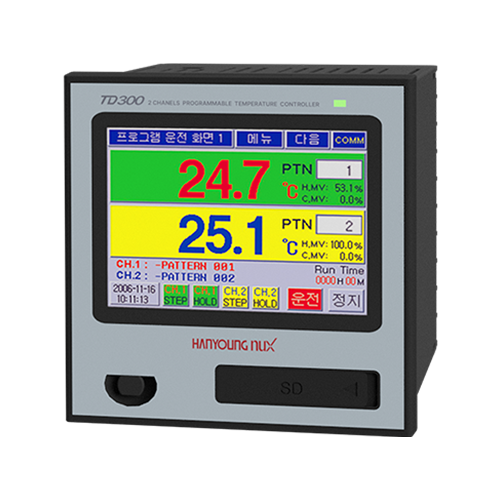
TD300
|
3.5 Inch Color LCD and Interface with Touch Panel
|
|
Pattern
|
Max. 100 , Available to operate each channel's pattern
|
|
Segment
|
Max. 2,400 (Max 100 per segment)
|
|
Waiting Mode
|
Setup per pattern and setup of using or not using per segment
|
|
Repetition & Connection
|
Available to use Pattern Repetition and Section Repeat Loof Setup (Max. 20)
Free connecting operation among patterns is available
|
|
PID Group
|
Each channel 4 Zones, Selectable between manual or automatic
|
|
Control Method
|
Heating control or Heating/Cooling control in each channel. PID or
ON/OFF control
|
|
Auto Tuning
|
Optimal PID GAIN is automatically calculated according to Set Value.
It could be operated by each channel
|
|
Proportional Band
|
0.0 ~ 1000.0 ℃ (If "0" = On/Off control, Not "0" = PID control)
|
|
Integral Time
|
0 ~ 6000 sec ("0" = No Integral Calculation)
|
|
Differential Time
|
0 ~ 6000 sec ("0" = No Differential Calculation)
|
|
ON/OFF control
|
Available to select Dead zone 0.1 ~ 1000.0 ℃
|
|
Event Log
|
Max. 40 Event Logs could be saved depending on various situations
|
|
LCD protection
|
Back light will be off according to designated time of not using touch panel
|
|
Password
|
Password is available to prevent other people from changing system setup
|
|
Protection of Over-Integral and Differential
|
ARW Zone setup (50 ~ 200 % of proportional band)
|
|
Fuzzy Function
|
Control overshoot
|
|
RAMP
|
Available to select SV changing ratio in case of fixing operation
|
|
Restrict MV changing ratio
|
Function to control sudden change of MV
|
|
Alarm Setup
|
4 points, High, Low, Deviation etc. 20 kinds
|
|
Inner Signal
|
8 points, object, range and delayed time setup are available
|
|
Time Signal
|
8 points when program mode operation
|
|
Graph Function
|
PV, SV of each channel could be display by graph
|
|
Fixing Operation Hour
|
Available to set fixing operation hour up
|
|
Reservation Operation Fuction
|
Available to use reservation operation time by using built in timer.
|
|
User Logo Display
|
User logo could be shown for 3 sec after power on. Download through communication port
|
|
Screen Capture
|
Upload is available through communication port
|
|
Language
|
Korean and English
|
|
Contact Input
|
RUN/STOP, STEP, HOLD and Error Input (Stop operation, Delayed/ setup is available)
|
|
Contact Output
|
Output of various signals
|
|
Storage in Power Failure
|
Various setting and operation information memory
|
|
Return from Power Failure
|
STOP / COLD / HOT return when power failure is restored
|